"How much RAM do I need" has a different answer depending on what the machine is for, and the question people forget to ask — how the memory is arranged — often matters as much as the total. This article goes through the three workloads that decide it, and the configuration mistakes that throw away performance you paid for.
Gaming: 16 GB is the floor, 32 GB is the comfortable choice
We read the published requirements of the 25 games in our catalogue released since 2023, and the picture is covered in detail in what recent PC games actually ask for. The short version: 16 GB is now the recommended figure for almost all of them, and six ask for 32 GB in their recommended tier — flight and space simulators, and large open worlds aimed at 1440p.
A requirement box describes the game alone. In practice the game shares the machine with the operating system, a browser with a dozen tabs, a voice chat client and a launcher or two, which together can hold several gigabytes before the game starts. That is the real argument for 32 GB in a new gaming build: not that a game needs it, but that the machine does while the game runs. Going beyond 32 GB buys nothing for gaming.
Local AI: the memory that catches what the graphics card cannot hold
When a language model is too large for the card's video memory, runtimes such as llama.cpp and Ollama can keep part or all of it in system RAM and run those layers on the processor. That turns RAM from a background figure into the thing that decides whether a model runs at all.
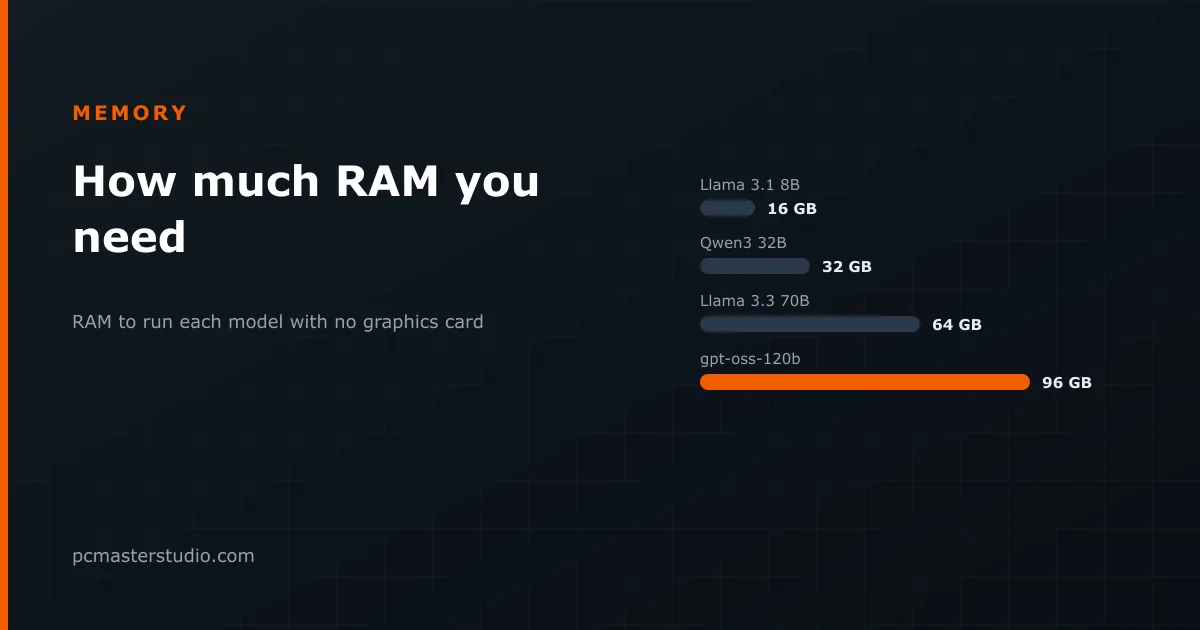
The sizing rule is simple: the part of the model that does not fit on the card has to fit in RAM, with room left for everything else. Using the figures from our VRAM article:
| Model, 4-bit, 8K context | Memory needed | RAM to run it with no graphics card |
|---|---|---|
| Llama 3.1 8B | 5.7 GB | 16 GB |
| Qwen3 32B | 19.7 GB | 32 GB |
| Llama 3.3 70B | 40.0 GB | 64 GB |
| gpt-oss-120b | 62.3 GB | 96 GB |
Fitting is not the same as being fast. Generation speed is set by how quickly the weights can be read, as explained in our article on memory bandwidth, and system RAM is far slower than video memory. Dual-channel DDR5-6000 moves about 96 GB/s in theory; an RTX 4090 moves 1,008 GB/s. Run a 70B model from RAM and you should expect one or two tokens a second — usable for a batch job, painful for a conversation.
Mixture-of-experts models are the exception worth knowing. gpt-oss-120b needs about 62 GB to hold, but activates only around 5 billion parameters per token, so each token reads only a few gigabytes. Running from system RAM it is far quicker than a dense model of the same size — which makes a machine with 96 or 128 GB of RAM and a modest graphics card a genuine option for it.
Work: the only case for 64 GB and more
Outside local AI, the workloads that fill large amounts of memory are specific and you will know if you run them: video editing with high-resolution footage and effects, large photo composites, 3D scenes with heavy textures, virtual machines, and compiling large codebases with many parallel jobs. Each parallel compile job can hold one to two gigabytes, so a sixteen-core machine building a big project can use 32 GB for the compiler alone. For these, 64 GB is a reasonable starting point. For everything else, it is money better spent on the processor or the graphics card.
How the memory is arranged matters as much as how much
Two modules, not one
Desktop platforms read memory over two channels, and each channel needs its own module. A single 32 GB stick runs on one channel and gives you half the bandwidth of two 16 GB sticks. In games that are sensitive to memory, and in anything running a language model from RAM, that is a large and entirely avoidable loss. Always buy memory as a matched pair.
Two modules, not four
The opposite mistake is filling all four slots. With DDR5, four modules put more electrical load on the memory controller, and both processor makers rate four modules at noticeably lower speeds than two. A kit that runs at 6000 MT/s as a pair may only be stable well below that as a set of four. If you need 64 GB, two 32 GB modules are better than four 16 GB ones; if you need 128 GB, two 64 GB modules exist.
Turn the profile on
Memory ships running at a conservative default speed. The speed printed on the box is a profile — XMP on Intel, EXPO on AMD — that has to be switched on once in the BIOS. A surprising number of machines run for years at the default. It takes a minute to check.
DDR4 or DDR5?
That depends on the platform, not on preference: current AMD and Intel desktop processors use DDR5 only, and older ones use DDR4. If you are upgrading an existing DDR4 machine, adding memory is cheap and the rules above still apply. For a new build, the DDR4 vs DDR5 comparison sets out the real-world differences.
Where this advice can be wrong
Requirement boxes are written by publishers and are not measurements; some games use far less than they recommend and a few use more. Memory use in local AI depends on the runtime, the context length and whether the cache is quantized. And prices move: when memory is cheap, buying 32 GB instead of 16 GB costs little and removes a question for years; when it is expensive, 16 GB in two modules is still a perfectly good gaming machine.