Using it in three steps
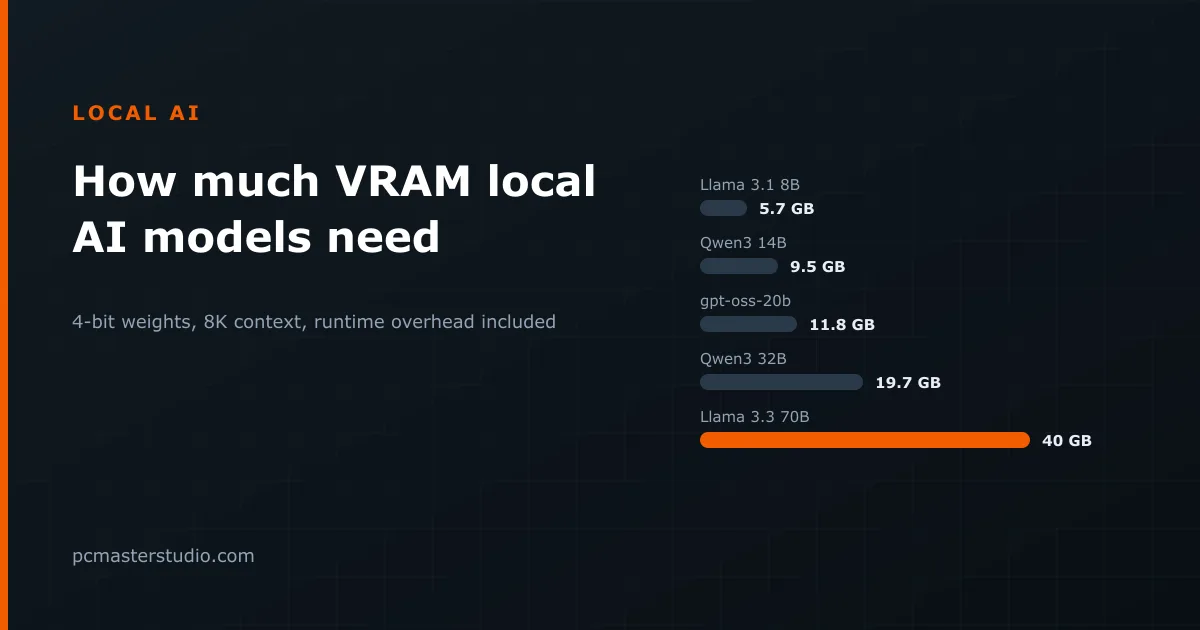
- Pick the model. Models are grouped by family. The size in billions of parameters is what drives everything else, so a "14B" from one family behaves much like a 14B from another.
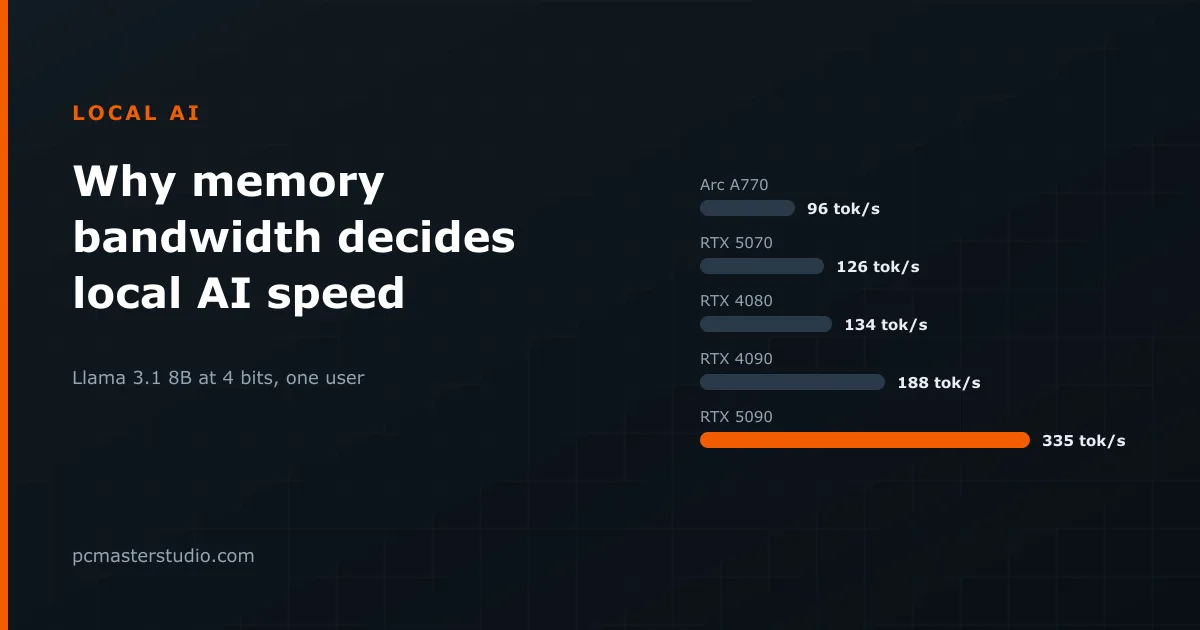
- Pick the graphics card. What matters here is its memory bandwidth, shown under each name in GB/s, and its memory capacity. The brand only matters through those two numbers.
- Pick the quantization. Q4_K_M is the usual starting point: a quarter of the size of the 16-bit original with a quality loss most people do not notice in conversation. The table under the result shows the same model and card at every format, so you can see what going up or down costs.
What the number and the labels mean
The large figure is generation speed: tokens written per second once the answer has started. A token is roughly three quarters of an English word. The speed label follows fixed bands: excellent from 80 tokens per second, good from 40, moderate from 15 and slow below that. Anything above about 15 reads faster than most people can follow it.
The memory badge compares the model's weights with the card's memory. Up to 85 % is fits, which leaves room for the context. From 85 % to 100 % is tight: it loads, but a long conversation may not. Above 100 % the model does not fit at all, and the tool shows no speed rather than a misleading one, because a model that spills into system memory runs at a small fraction of the estimate.
Prompt processing — reading what you paste in before the answer starts — is shown at ten times the generation rate, because it works on the whole prompt at once instead of one token at a time.
Worked examples from the catalogue
- Same memory, different speed. Qwen3 14B at Q4_K_M weighs 7.4 GB. On an RTX 5060 Ti 16 GB (448 GB/s) that is 448 ÷ 7.4 × 0.75 ≈ 45 tokens per second. On an RTX 4060 Ti 16 GB (288 GB/s) it is about 29. Both cards hold the model with room to spare; the faster memory alone makes the first one about 55 % quicker.
- The faster card that cannot run it. Qwen 2.5 32B at Q4_K_M needs 16.3 GB. An RTX 3090 (24 GB, 936 GB/s) runs it at about 43 tokens per second with a third of its memory free. An RTX 5080 has slightly more bandwidth (960 GB/s) but only 16 GB, so the same model overflows it. For local models, capacity decides what you can run and bandwidth decides how fast.
- Dropping a format to make it fit. Llama 3.3 70B at Q4_K_M is 35 GB, which overflows even an RTX 5090's 32 GB. At Q3_K_M it is 26.3 GB, fits at 82 %, and the 5090's 1,792 GB/s gives about 51 tokens per second.
- One model across formats. Llama 3.1 8B on an RTX 4070 (12 GB, 504 GB/s): FP16 (16 GB) does not fit; Q8_0 runs at about 47 tokens per second, Q6_K at 63, Q5_K_M at 75 and Q4_K_M at 94. Each step down reads less data per token, which is why quantization speeds generation up as well as shrinking the model.
When to trust it less
The estimate counts the model's weights only. It ignores the KV cache, which grows with the length of the conversation and can add several gigabytes at long contexts. Before buying a card for a specific model, check the fit in the LLM VRAM calculator, which adds the cache and the runtime's own overhead.
Mixture-of-experts models are treated as if every weight were read for every token. Qwen3 30B-A3B is counted as 15 GB at Q4_K_M and estimated at about 47 tokens per second on an RTX 3090. The memory figure is right, because every expert has to be loaded, but only a small share of the weights is read for each token, so real generation on these models is usually much faster than the estimate.
It also assumes one card, one request at a time and a well-optimised runtime. Splitting a model across two cards, serving several users at once, or a runtime falling back to a slow path will all move the result. The 0.75 factor and the reasoning behind it are on the methodology page.
Using it to choose a card
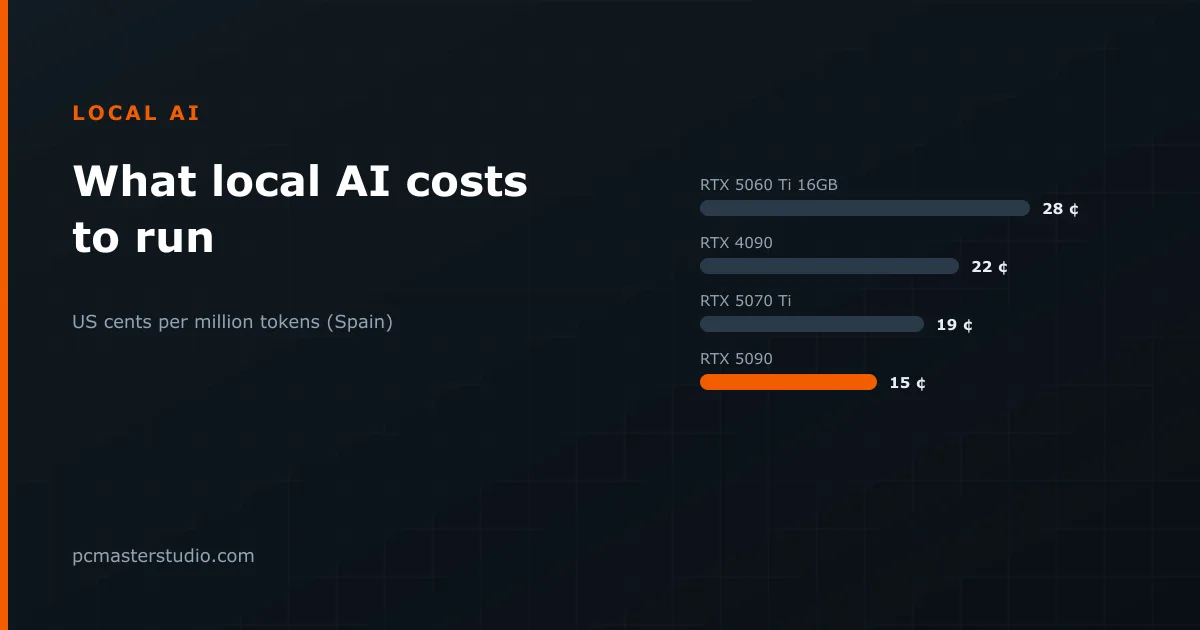
Start from the largest model you want to run, find the formats that fit, and only then compare speed. The list of fastest cards for the chosen model does exactly that, leaving out datacenter accelerators. If the card you would need costs more than you will use it, the buy vs rent calculator shows how many hours of cloud time the same money pays for, and the electricity calculator what running it at home costs.