Two graphics cards with the same amount of memory can generate text at very different speeds, and the specification that predicts the gap is not the one on the front of the box. It is memory bandwidth. This article explains why, puts real figures next to nine cards, and shows where the rule stops holding.
Why bandwidth and not compute
A language model writes one token at a time, and to produce each one it has to read every weight it is going to use. An 8-billion-parameter model quantized to 4 bits is about 4 GB of weights. Generating 100 tokens a second means moving 400 GB a second, every second, from the card's memory into its compute units.
That is an enormous amount of traffic and almost no arithmetic per byte moved — one multiply-accumulate for each weight read. The compute units finish their work and wait. So the ceiling is set by how fast memory can be read, and the estimate falls out of one division:
tokens per second ≈ memory bandwidth ÷ model size in memory, times an efficiency factor for the traffic that is not weights. Our inference speed estimator uses 0.75, and the methodology page explains where that number comes from.
The figures
Four-bit weights (Q4_K_M), so model size in gigabytes is roughly half the parameter count. A dash means the weights do not fit in the card's memory at all.
| Card | Bandwidth | Memory | Llama 3.1 8B | Qwen3 14B | Qwen3 32B |
|---|---|---|---|---|---|
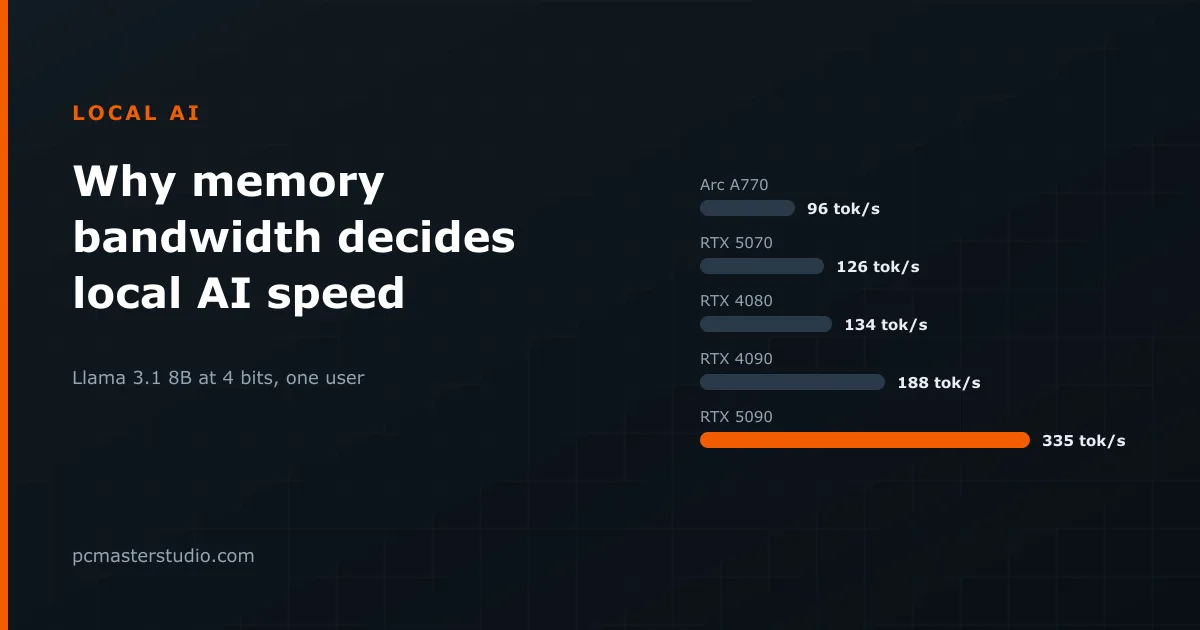
| RTX 5090 | 1792 GB/s | 32 GB | 335 tok/s | 182 tok/s | 82 tok/s |
| RTX 4090 | 1008 GB/s | 24 GB | 188 tok/s | 102 tok/s | 46 tok/s |
| RTX 5080 | 960 GB/s | 16 GB | 179 tok/s | 97 tok/s | — |
| RTX 5070 Ti | 896 GB/s | 16 GB | 167 tok/s | 91 tok/s | — |
| RTX 4080 | 717 GB/s | 16 GB | 134 tok/s | 73 tok/s | — |
| RTX 5070 | 672 GB/s | 12 GB | 126 tok/s | 68 tok/s | — |
| RX 7800 XT | 624 GB/s | 16 GB | 117 tok/s | 63 tok/s | — |
| RTX 3070 Ti | 608 GB/s | 8 GB | 114 tok/s | 62 tok/s * | — |
| Arc A770 | 512 GB/s | 16 GB | 96 tok/s | 52 tok/s | — |
Three things worth reading off it
Memory size and memory speed are separate gates
The RX 7800 XT and the RTX 5070 illustrate it. The Radeon has more memory — 16 GB against 12 — so it can hold a model the GeForce cannot. The GeForce has more bandwidth, so on a model they both hold, it generates faster. Capacity decides whether a model runs; bandwidth decides how fast. Buying for one and hoping for the other is the most common mistake here.
The RTX 3070 Ti is the sharper version of the same lesson. At 608 GB/s it moves data faster than an Arc A770, but with 8 GB it is shut out of everything above about 13 billion parameters. Its speed is real and mostly unusable.
The gap between generations is a memory gap
The RTX 5090 generates about 1.8 times as many tokens per second as an RTX 4090 on the same model. Its bandwidth is about 1.8 times higher. That is not a coincidence, and it is why generation-over-generation gaming benchmarks are a poor guide to this particular job: they measure a workload that is limited by something else.
Big models are slow on every card
Qwen3 32B needs about 16 GB of weights. Even on an RTX 5090 with the highest bandwidth on this list, that is 82 tokens a second — faster than you read, but a quarter of what the same card does with an 8B model. There is no card on which a 32B model is quick in the way a small one is. If responsiveness matters more than depth, the model choice moves the number far more than the card does.
The case that breaks the ranking
Apple's unified memory is the interesting exception. An M3 Ultra offers 819 GB/s — between an RTX 4090 and an RTX 5080 — but it can be configured with up to 256 GB, shared between the processor and the graphics units. On a 70B model, which no consumer graphics card holds at all, that machine is the one that runs it, at a speed a mid-range GeForce would manage if only it had the memory.
The trade is visible in the table's logic: Apple wins on capacity per euro at these sizes and loses on raw bandwidth against a flagship card. Which matters depends entirely on whether the model you want fits.
What the estimate does not cover
Reading a long prompt is a different job. Prefill processes all the input tokens at once, which is arithmetic-heavy rather than memory-heavy, so it runs roughly an order of magnitude faster and is limited by compute instead. A card that looks slow here can still ingest a long document quickly.
Batching changes the picture too: serving several requests at once reads the weights once for all of them, so tokens per second across the batch rises well above these figures. The numbers above describe one person typing to one model, which is what a desktop actually does.
And the efficiency factor is a single number standing in for many things — cache traffic, attention over the context, kernel quality, whether the runtime is llama.cpp or vLLM, and how hot the card is. Treat the table as a ranking you can trust and an absolute value you should not, and check your own combination in the inference speed estimator. To find out whether a model fits before worrying about how fast it runs, the VRAM calculator answers that first question.