Running a language model on your own machine has one hard gate in front of it: the model, its cache and the runtime have to fit in the graphics card's memory. Below that line everything works; above it, the runtime spills into system memory and generation slows to a crawl. This article works out where that line falls for eighteen models people actually download, using the same arithmetic as our VRAM calculator.
What the memory is spent on
- The weights: parameters × bits per weight ÷ 8. A 4-bit quantization of an 8-billion-parameter model is around 4.2 GB.
- The KV cache: 2 × context tokens × layers × KV heads × head dimension × 2 bytes. This is the part that surprises people, because it grows with how much text is in play.
- Runtime overhead: half a gigabyte, give or take, for buffers the framework allocates.
The full formula and its limits are on the methodology page, and the VRAM guide goes through it with worked examples.
The table
Figures in binary gigabytes (GiB), the unit your driver reports. Q4_K_M is the 4-bit format most people run; Q8_0 is the near-lossless one.
| Model | Parameters | Q4, 8K context | Q4, 32K context | Q8, 8K context |
|---|---|---|---|---|
| Llama 3.2 3B | 3.2 B | 3.1 GB | 5.7 GB | 4.4 GB |
| Qwen3 4B | 4.0 B | 3.7 GB | 7.1 GB | 5.4 GB |
| Gemma 3 4B * | 4.3 B | 3.8 GB | 7.0 GB | 5.6 GB |
| Mistral 7B v0.3 | 7.2 B | 5.3 GB | 8.3 GB | 8.2 GB |
| Qwen 2.5 7B | 7.6 B | 4.9 GB | 6.2 GB | 8.0 GB |
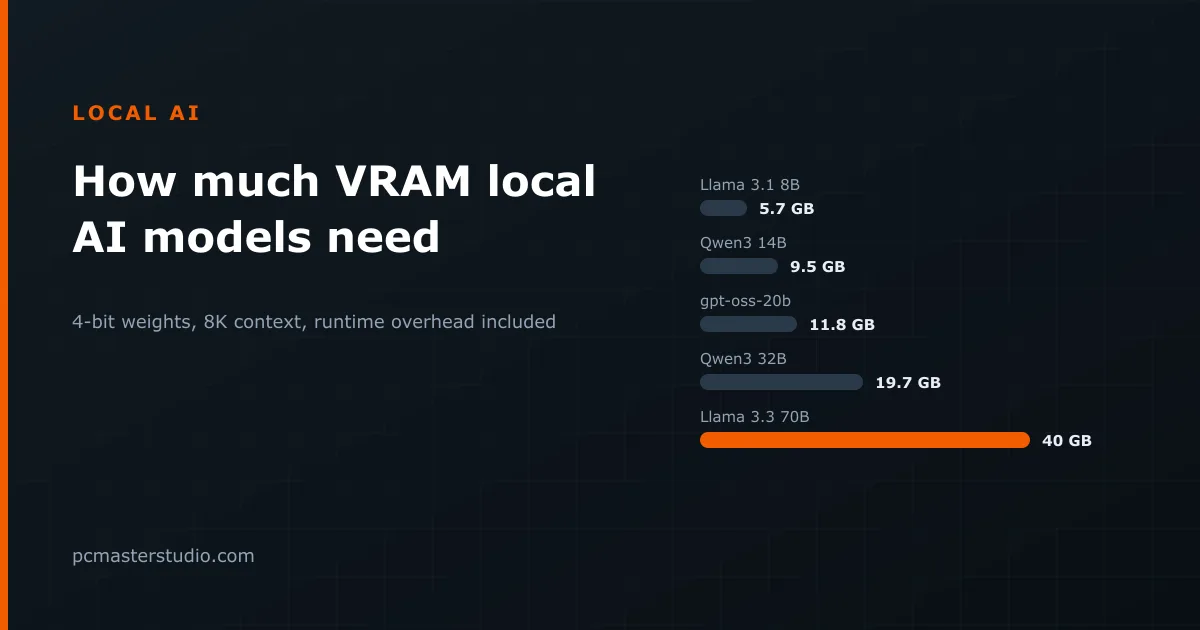
| Llama 3.1 8B | 8.0 B | 5.7 GB | 8.7 GB | 9.0 GB |
| Qwen3 8B | 8.2 B | 5.9 GB | 9.3 GB | 9.3 GB |
| Mistral Nemo 12B | 12.2 B | 8.1 GB | 11.9 GB | 13.1 GB |
| Gemma 3 12B * | 12.2 B | 9.9 GB | 18.9 GB | 14.9 GB |
| Phi-4 14B | 14.0 B | 9.4 GB | 14.1 GB | 15.1 GB |
| Qwen3 14B | 14.8 B | 9.5 GB | 13.3 GB | 15.5 GB |
| gpt-oss-20b * | 20.9 B | 11.8 GB | 12.9 GB | — |
| Qwen3 30B-A3B | 30.5 B | 17.2 GB | 19.5 GB | 29.7 GB |
| Gemma 3 27B * | 27.4 B | 18.7 GB | 30.4 GB | 29.9 GB |
| Qwen3 32B | 32.8 B | 19.7 GB | 25.7 GB | 33.0 GB |
| Mixtral 8x7B | 46.7 B | 26.0 GB | 29.0 GB | 45.0 GB |
| Llama 3.3 70B | 70.6 B | 40.0 GB | 47.5 GB | 68.8 GB |
| gpt-oss-120b * | 116.8 B | 62.3 GB | 63.9 GB | — |
What fits on the card you have
- 8 GB — models up to 8 billion parameters at 4 bits with a short context: Llama 3.1 8B (5.7 GB), Qwen3 8B (5.9 GB), Mistral 7B (5.3 GB). Push the context to 32K and most of them no longer leave room.
- 12 GB — the 12–14B class at 4 bits: Mistral Nemo (8.1 GB), Phi-4 (9.4 GB), Qwen3 14B (9.5 GB). Or an 8B model at 32K context, or a 7B one at 8 bits.
- 16 GB — gpt-oss-20b (11.8 GB), a 14B model with a long context (13–14 GB), or a 12B model at 8 bits.
- 24 GB — the 27–32B class at 4 bits: Qwen3 30B-A3B (17.2 GB), Gemma 3 27B (18.7 GB), Qwen3 32B (19.7 GB).
- 32 GB — a 32B model with a 32K context (25.7 GB) or Mixtral 8x7B (26.0 GB).
- Above that — Llama 3.3 70B at 4 bits needs about 40 GB, which means two 24 GB cards, a workstation card, or a machine with a large pool of unified memory. gpt-oss-120b needs around 62 GB.
Three things the table teaches
Context is not free
Llama 3.1 8B needs 1.0 GB of cache at 8K tokens and 4.0 GB at 32K. The weights did not move; the conversation did. If a model loads happily and then slows down or crashes after a long session, this is usually why.
Attention design matters as much as size
Qwen 2.5 7B and Llama 3.1 8B are almost the same size, yet at 32K context one needs 6.2 GB and the other 8.7 GB. The difference is the number of key–value heads: four against eight. Models designed with fewer KV heads, or with sliding-window attention like Gemma 3 and gpt-oss, are far cheaper to run with long inputs.
Mixture-of-experts models are fast, not small
Qwen3 30B-A3B activates about 3 billion parameters per token, so it generates quickly — but all 30 billion have to sit in memory. The same applies to Mixtral 8x7B and the gpt-oss pair. They buy speed, not space.
Where these figures can be off
They are a planning estimate, not a measurement of your setup. Runtimes allocate differently; llama.cpp, Ollama, LM Studio and vLLM each reserve their own buffers. Quantizing the KV cache to 8 bits roughly halves the cache column. Vision-capable models add an encoder. And the operating system, the desktop and a browser are already using some of the card's memory before the model loads, which is why it is worth leaving a gigabyte or two spare rather than aiming for an exact fit.
To try your own combination of model, quantization and context, use the VRAM calculator; to see how fast it will generate on a given card, the inference speed estimator works from memory bandwidth.