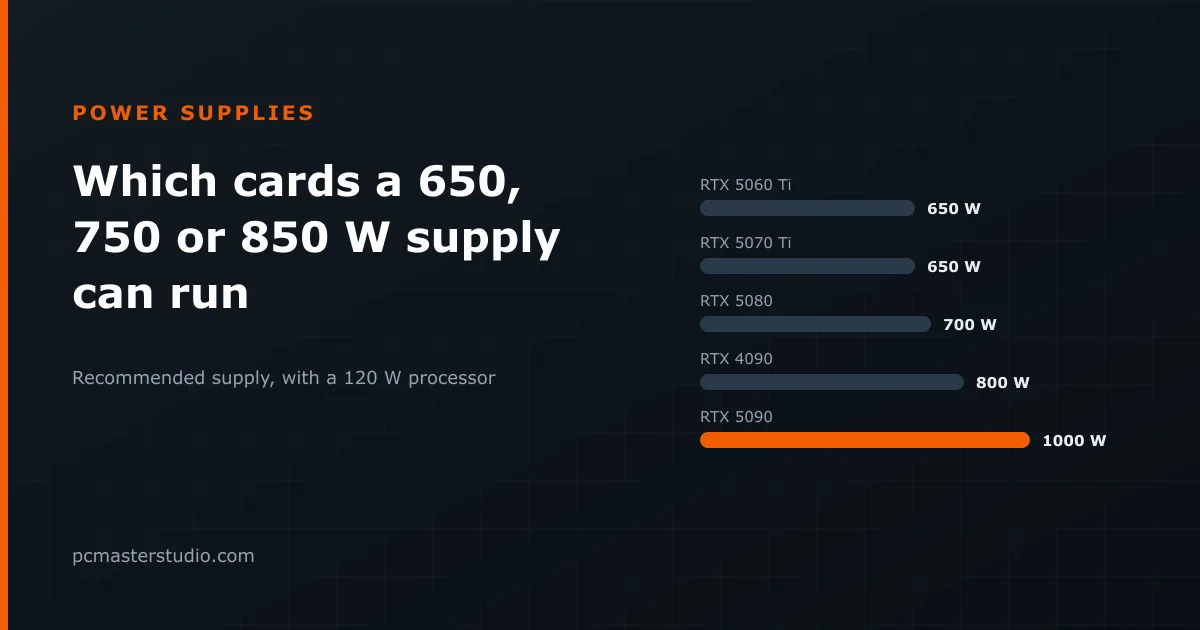
The question usually arrives backwards. People rarely ask "what supply does this card need" before buying; they already own a power supply and want to know which graphics card it can take. The answer depends on the processor more than most people expect, so this article works it out for 35 current and recent cards against four classes of processor, using the same arithmetic as our power supply calculator.
How the numbers are worked out
Each figure below comes from one rule, written out in full on the methodology page:
- Estimated draw = the card's rated power + the processor's rated power + 50 W for the motherboard, memory and storage.
- Recommended supply = that draw × 1.25, rounded up to the next 100 W, and never less than 650 W.
The 25% margin is not a safety blanket for its own sake. A supply running close to its limit is at the noisy, inefficient end of its curve, and modern graphics cards produce very short power spikes well above their rating. The margin is what keeps those spikes from tripping the supply's protection in the middle of a game.
The short answer, by supply size
This is the highest rated card power each supply covers, for each class of processor. "Rated power" is the figure the card's manufacturer publishes — total graphics power for NVIDIA, total board power for AMD and Intel.
| Supply | 65 W processor | 120 W processor | 170 W processor | 250 W-class processor |
|---|---|---|---|---|
| 650 W | up to 365 W | up to 310 W | up to 260 W | up to 177 W |
| 750 W | up to 445 W | up to 390 W | up to 340 W | up to 257 W |
| 850 W | up to 525 W | up to 470 W | up to 420 W | up to 337 W |
| 1000 W | up to 685 W | up to 630 W | up to 580 W | up to 497 W |
Which processors fall into which column:
- 65 W: Ryzen 5 7600 and 9600X, Ryzen 7 7700 and 9700X.
- 120 W: Ryzen 7 7800X3D and 9800X3D, Ryzen 9 9900X.
- 170 W: Ryzen 9 7900X, 7950X and 9950X.
- 250 W class: Intel Core i7-14700K and i9-14900K (253 W maximum turbo power), Core Ultra 7 265K and Core Ultra 9 285K (250 W).
The two brands publish different kinds of figure, and it matters here. AMD's headline number is TDP; the socket actually allows about 1.35 times that (88 W for a 65 W chip, 162 W for a 120 W one, 230 W for a 170 W one), which the 25% margin on the whole system largely absorbs. Intel's unlocked chips are listed with their maximum turbo power, and many motherboards let them hold it indefinitely, so an Intel K build legitimately gets a bigger recommendation.
Card by card
| Graphics card | Rated power | 65 W CPU | 120 W CPU | 170 W CPU | 253 W CPU |
|---|---|---|---|---|---|
| GeForce RTX 5050 | 130 W | 650 W | 650 W | 650 W | 650 W |
| GeForce RTX 5060 | 145 W | 650 W | 650 W | 650 W | 650 W |
| GeForce RTX 5060 Ti | 180 W | 650 W | 650 W | 650 W | 700 W |
| GeForce RTX 5070 | 250 W | 650 W | 650 W | 650 W | 700 W |
| GeForce RTX 5070 Ti | 300 W | 650 W | 650 W | 700 W | 800 W |
| GeForce RTX 5080 | 360 W | 650 W | 700 W | 800 W | 900 W |
| GeForce RTX 5090 | 575 W | 900 W | 1000 W | 1000 W | 1100 W |
| GeForce RTX 4060 | 115 W | 650 W | 650 W | 650 W | 650 W |
| GeForce RTX 4060 Ti 16 GB | 165 W | 650 W | 650 W | 650 W | 650 W |
| GeForce RTX 4070 | 200 W | 650 W | 650 W | 650 W | 700 W |
| GeForce RTX 4070 Super | 220 W | 650 W | 650 W | 650 W | 700 W |
| GeForce RTX 4070 Ti Super | 285 W | 650 W | 650 W | 700 W | 800 W |
| GeForce RTX 4080 Super | 320 W | 650 W | 700 W | 700 W | 800 W |
| GeForce RTX 4090 | 450 W | 800 W | 800 W | 900 W | 1000 W |
| GeForce RTX 3060 12 GB | 170 W | 650 W | 650 W | 650 W | 650 W |
| GeForce RTX 3060 Ti | 200 W | 650 W | 650 W | 650 W | 700 W |
| GeForce RTX 3070 | 220 W | 650 W | 650 W | 650 W | 700 W |
| GeForce RTX 3070 Ti | 290 W | 650 W | 650 W | 700 W | 800 W |
| GeForce RTX 3080 10 GB | 320 W | 650 W | 700 W | 700 W | 800 W |
| GeForce RTX 3080 Ti | 350 W | 650 W | 700 W | 800 W | 900 W |
| GeForce RTX 3090 | 350 W | 650 W | 700 W | 800 W | 900 W |
| GeForce RTX 3090 Ti | 450 W | 800 W | 800 W | 900 W | 1000 W |
| Radeon RX 9060 XT 16 GB | 160 W | 650 W | 650 W | 650 W | 650 W |
| Radeon RX 9070 | 220 W | 650 W | 650 W | 650 W | 700 W |
| Radeon RX 9070 XT | 304 W | 650 W | 650 W | 700 W | 800 W |
| Radeon RX 7600 | 165 W | 650 W | 650 W | 650 W | 650 W |
| Radeon RX 7600 XT | 190 W | 650 W | 650 W | 650 W | 700 W |
| Radeon RX 7700 XT | 245 W | 650 W | 650 W | 650 W | 700 W |
| Radeon RX 7800 XT | 263 W | 650 W | 650 W | 700 W | 800 W |
| Radeon RX 7900 GRE | 260 W | 650 W | 650 W | 650 W | 800 W |
| Radeon RX 7900 XT | 315 W | 650 W | 700 W | 700 W | 800 W |
| Radeon RX 7900 XTX | 355 W | 650 W | 700 W | 800 W | 900 W |
| Arc B570 | 150 W | 650 W | 650 W | 650 W | 650 W |
| Arc B580 | 190 W | 650 W | 650 W | 650 W | 700 W |
| Arc A770 16 GB | 225 W | 650 W | 650 W | 650 W | 700 W |
What the table actually says
A good 650 W unit covers more than people think
With a 120 W processor, every card rated up to about 310 W lands on the 650 W floor. That includes the RTX 5070 Ti and the RX 9070 XT, two cards that do not need the 850 W units they are often paired with. Unless you plan to change processor or overclock, the money is usually better spent on a well-built 650 or 750 W supply than on a bigger, cheaper one.
The processor moves the answer by a full size
Swap a 120 W chip for an Intel Core i9-14900K and the same RTX 5070 Ti goes from 650 W to 800 W. That is not the calculator being cautious: the i9 is allowed to draw 253 W on its own, more than the rest of a mid-range machine combined. The same happens, less sharply, with 170 W Ryzen 9 chips.
The top of the range is its own category
An RTX 4090 or 3090 Ti starts at 800 W whatever sits next to it, and the RTX 5090 needs 900 W with the most frugal processor and 1100 W with an Intel K chip. These are also the cards whose power connector deserves the most care. NVIDIA cards from the RTX 40 series onwards, and some high-end partner cards from other brands, use the 16-pin 12V-2x6 (12VHPWR) connector, and for those a supply with that cable built in is a better match than an adapter.
When to buy a bigger supply than the table says
- You overclock the card or the processor, or raise their power limits.
- You already know the next card you will buy, and it sits a row or two lower in the table.
- The machine runs heavy loads for hours — rendering, local AI, long compiles — where a supply working at half load runs cooler and quieter.
- You are adding many drives, fans, lighting or USB-powered devices; the 50 W allowance covers a typical build, not an unusual one.
What the table cannot tell you is how good a particular unit is. A well-reviewed 750 W supply is a better purchase than a poorly made 1000 W one, and wattage on the box says nothing about which is which.
Check your own combination
If your processor or card is not listed, or you want to include drives and fans, the power supply calculator adds up your actual parts in the same way. For the reasoning behind the margin, the guide to sizing a power supply goes through it step by step.