Using it
- Choose the processor and the graphics card. Between them they account for most of what a gaming PC draws, so these two decide the answer.
- Add the extras if you have them: the cooler's pump and fans, case fans, lighting and other devices. Each adds a few watts; together they can move a build across a 100 W step.
- Read the breakdown under the total. It shows where the watts go, which usually settles the question of whether the RGB matters (it rarely does).
The three steps behind the number
- System draw = graphics card rated power + processor rated power + 50 W for the motherboard, memory and a drive, plus anything you added.
- Headroom: the draw is multiplied by 1.25. Graphics cards draw brief spikes well above their rating, and a supply that sits at its limit runs hotter, louder and less efficiently.
- Rounding: the result goes up to the next 100 W, because that is how supplies are sold, and never below 650 W, because good units below that are hard to find and cost about the same.
Five builds, worked through
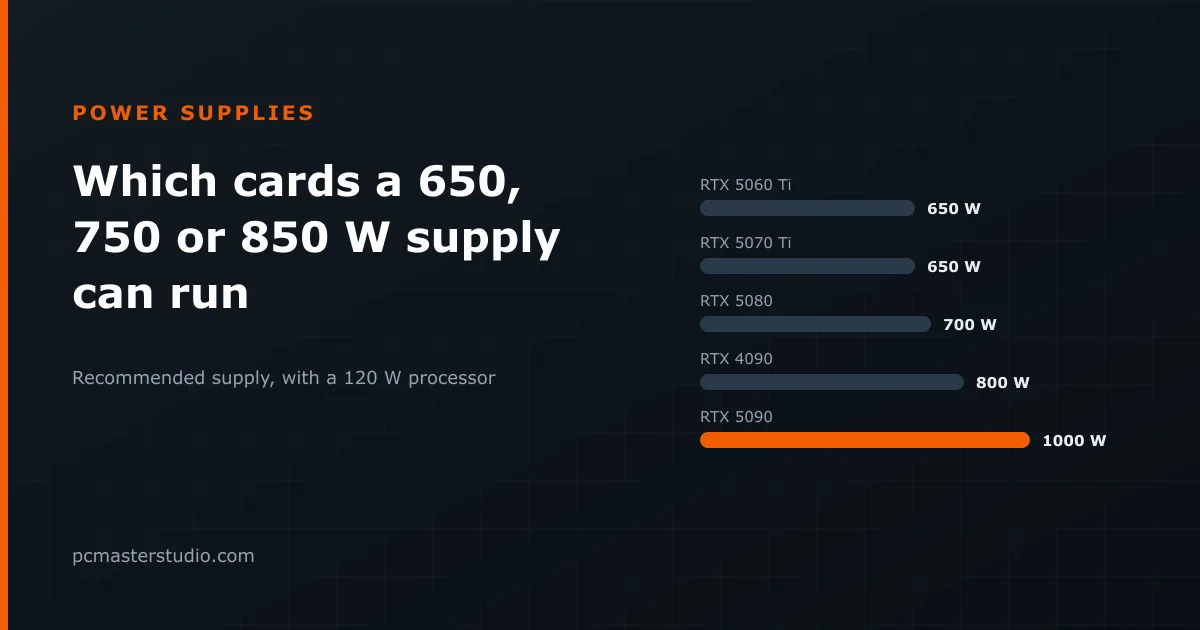
- Ryzen 5 7600 + RTX 5060 Ti: 65 + 180 + 50 = 295 W. With headroom that is 369 W, which rounds to 400 W — but the floor lifts it to 650 W. A quality 650 W unit is the sensible minimum, and it leaves room for a bigger card later.
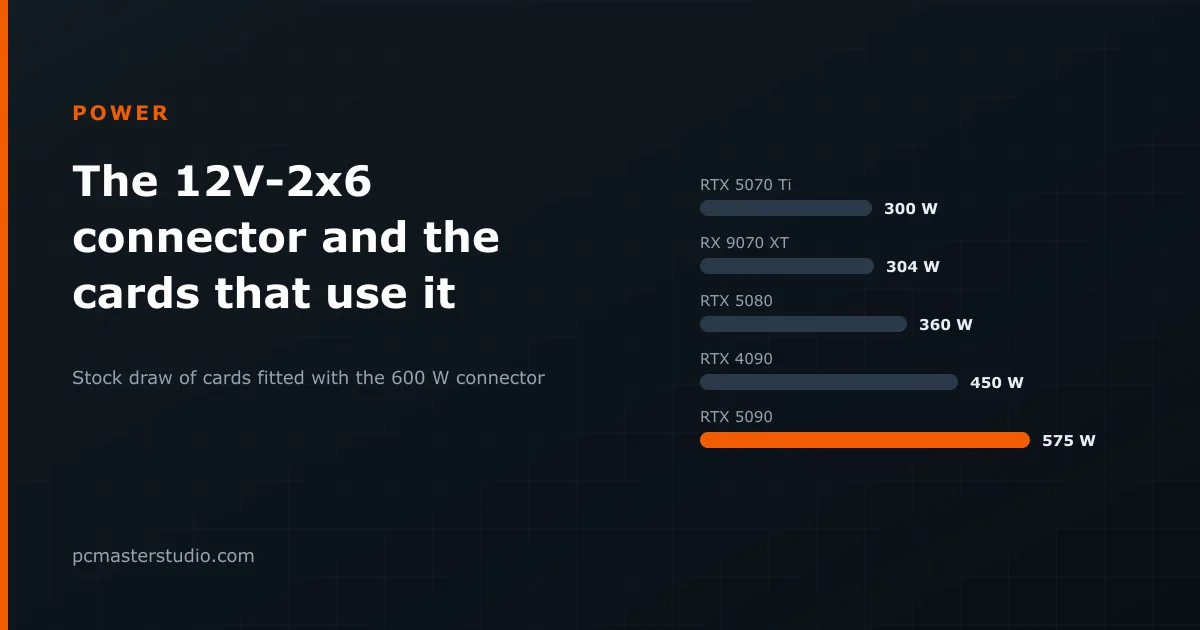
- Ryzen 7 9800X3D + RTX 5070 Ti: 120 + 300 + 50 = 470 W, × 1.25 = 588 W, rounded to 600 W and lifted to 650 W. At 300 W this card uses the 12V-2x6 connector, so a supply with a native cable is worth choosing.
- Ryzen 7 9800X3D + RTX 5080: 120 + 360 + 50 = 530 W, × 1.25 = 663 W, rounded up to 700 W.
- Core i7-14700K + RTX 4090: 253 + 450 + 50 = 753 W, × 1.25 = 941 W, rounded up to 1,000 W. The 253 W is the processor's turbo limit, not its base figure, so this one is already sized for a processor running flat out.
- Ryzen 9 9950X + RTX 5090: 170 + 575 + 50 = 795 W, × 1.25 = 994 W, rounded up to 1,000 W. It lands just under the step; with a large liquid cooler and many fans added, it crosses into 1,100 W territory, and a 1,200 W unit is the comfortable choice.
When to buy one size up
Rated power is not peak power. AMD processors are allowed to draw about 1.35 times their rated figure by default, so a 120 W Ryzen 7 9800X3D can pull around 160 W under a heavy all-core load. Overclocking, raising power limits in the BIOS, or a graphics card with a factory overclock all add to the real draw. If any of that applies, go one step above the recommendation.
Buying bigger does not cost you electricity: a supply delivers what the parts ask for, not its label. What a bigger unit costs is money up front, so the margin is worth paying for when you plan to upgrade the graphics card within the life of the supply, which is often ten years.
Wattage is only half of it
Two 750 W supplies can be very different products. Look for a recent ATX 3.1 unit if your card uses the 12V-2x6 connector, an 80 PLUS Gold rating or better, and a long warranty, which is the clearest sign of what the maker expects from its own parts. The figures used for every part, and the limits of the method, are on the methodology page. To see what the finished build costs to run, take its draw to the electricity cost calculator.