A graphics card spec sheet is ordered by commercial impact, not by usefulness. The numbers that sell cards sit at the top; the ones that decide whether a card suits you are scattered lower down, and a few of the most important are not on the sheet at all. This article goes through the sheet in the order worth reading it, with eight current cards side by side.
Eight sheets, reduced to what matters
| Card | Memory | Bandwidth | Power | Gaming index |
|---|---|---|---|---|
| GeForce RTX 5060 | 8 GB | 448 GB/s | 145 W | 4,700 |
| Radeon RX 9060 XT 16GB | 16 GB | 320 GB/s | 160 W | 4,900 |
| GeForce RTX 5060 Ti 16GB | 16 GB | 448 GB/s | 180 W | 5,600 |
| GeForce RTX 5070 | 12 GB | 672 GB/s | 250 W | 7,100 |
| Radeon RX 9070 XT | 16 GB | 640 GB/s | 304 W | 8,000 |
| GeForce RTX 5070 Ti | 16 GB | 896 GB/s | 300 W | 8,200 |
| GeForce RTX 5080 | 16 GB | 960 GB/s | 360 W | 9,800 |
| GeForce RTX 5090 | 32 GB | 1,792 GB/s | 575 W | 12,000 |
1. Memory capacity is a threshold, not a scale
Memory capacity behaves like a gate. Below what your workload needs, performance collapses — textures stream in late, frame times spike, and some games refuse their higher settings. Above it, adding more does nothing at all. That is why comparing two cards on gigabytes alone leads to wrong conclusions so often.
The table shows it from both sides. The RTX 5070 has 12 GB and sits well above the 16 GB RX 9060 XT and RTX 5060 Ti in games, because in most games 12 GB is past the threshold. Change the workload to a local language model and the order reverses: a model that needs 13 GB runs on either 16 GB card and not at all on the 5070. Know which side of the gate your work sits before comparing capacity.
2. Bandwidth: the number almost nobody checks
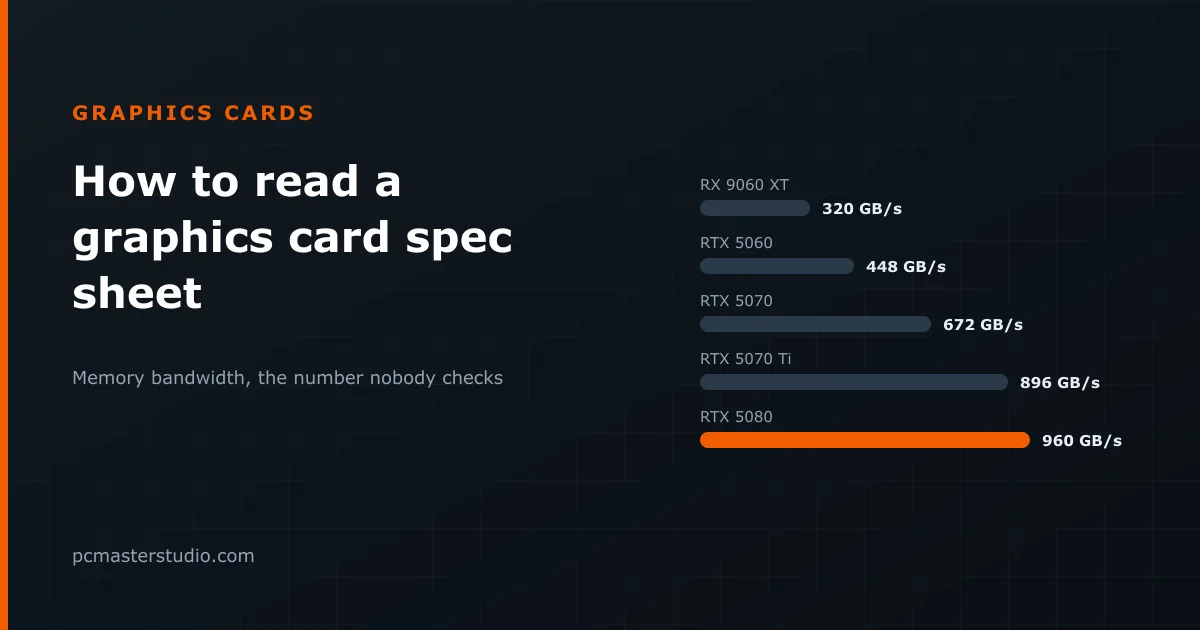
Memory bandwidth describes how fast the card can read its own memory. It usually sits further down the sheet than capacity, and predicts considerably more.
In AI workloads it is very nearly the whole answer. Generating text means reading every weight of the model for every token, so tokens per second scale with bandwidth: the RTX 5090, with twice the bandwidth of the 5070 Ti, generates roughly twice as fast on a model both can hold. Our inference speed estimator is built on exactly that division.
In games the link is looser, which the table also shows. The RTX 5060 and the RTX 5060 Ti have identical bandwidth, and the Ti still scores about 19 % higher, because it has more processing units to use the same data. The RX 9070 XT has less bandwidth than the RTX 5070 and scores above it. Bandwidth becomes more important as resolution rises, because every frame moves more data.
3. Clock speeds and core counts compare only within a family
Sheets list a boost clock and a number of shader cores — "CUDA cores" on NVIDIA, "stream processors" on AMD. Neither compares across brands, and neither compares across generations. How much work a card does per core per cycle changes with the architecture, so a lower figure on a newer design can perform substantially better. Use them to compare two cards of the same generation from the same maker, and nothing else.
4. Power draw is a constraint, not a flaw
The power figure governs your supply, your cooling and sometimes your cable. It is worth carrying into the buying decision from the start rather than discovering it afterwards, because it is the constraint that most often turns a one-part purchase into a two-part one. The spread in the table runs from 145 W to 575 W — the difference between a card any supply can feed and one that needs a 1000 W unit.
Our power supply calculator settles whether your current supply is enough in a minute, and flags the cards from about 300 W upwards that usually carry the 16-pin 12V-2x6 power connector instead of conventional 8-pin plugs. The sizes a supply needs for 35 cards are worked out in which graphics card your power supply can run.
5. The lines that decide whether it fits
- Length and slot width. High-end cards can exceed 330 mm and occupy three or more slots. Cases publish a maximum card length; measure before buying, not after.
- PCIe lanes. Several entry and mid-range cards use eight PCIe lanes rather than sixteen. On a current board that costs nothing measurable. On an older PCIe 3.0 board it can cost performance, and it hurts most on 8 GB cards when a game overflows their memory and has to fetch data over the bus. If your board is a few generations old, check this line.
- Outputs. The number and version of DisplayPort and HDMI outputs decide which monitors, resolutions and refresh rates you can drive. A high-refresh 4K monitor needs a recent standard on both ends.
What the sheet does not say
Nothing about noise under load. Nothing about how well a particular manufacturer's cooler handles the chip — the same GPU can run quiet on one board partner's design and loud on another's. Nothing about the state of the drivers and software features, which change over a card's life. Those three affect daily use more than several of the printed figures, and they are what independent reviews measure. Read the sheet to narrow the list; read reviews of the specific model to choose from it.
Where these figures can be off
The index is an average across many games and cannot tell you how a card handles the one you play most. Power figures are for reference designs; factory-overclocked models draw more. And specifications change within a model name — memory speed, lane count or even capacity — so read the sheet of the exact product you are buying. How the index is built is described on the methodology page.