First-build mistakes are not creative. They repeat, and they cluster in the same few places. Most of them cost an afternoon rather than a component, but each has a recognisable symptom, and knowing the symptom in advance is what turns a panicked evening into a five-minute fix. These are the six that come up most, three more that are easy to avoid, and how to spot each one.
1. Not checking the measurements
Three dimensions decide whether the parts fit together: graphics card length, cooler height and radiator clearance. Manufacturers publish all three, and cases publish their maximums. High-end graphics cards now pass 330 mm and occupy three or more slots; tall tower coolers reach 160 mm and more, which is exactly where many mid-tower cases draw the line.
The check takes two minutes with the spec pages open side by side. Discovering the incompatibility with everything unboxed is the most frustrating way to lose an afternoon — and often the most expensive, because an opened case or cooler may no longer be returnable. Two less obvious clashes are worth checking too: tall memory modules can block the first fan of a large air cooler, and a top-mounted radiator can collide with the motherboard's heatsinks.
2. Forgetting the processor power connector
Besides the large 24-pin connector on the side of the motherboard, there is a separate 8-pin connector for the processor near the top corner — two of them on many high-end boards. It is easy to miss, especially in a case where that corner is hard to reach once the board is in.
The symptom: the fans spin, the lights come on, and nothing appears on screen. The diagnosis then wanders off towards the memory or the graphics card for hours. Plug this connector in before the board goes into the case, while the corner is still easy to reach.
3. Skipping the bench test
Building the core of the machine on the motherboard box — processor, cooler, one stick of memory, graphics card, power supply — and checking it reaches the BIOS feels like an unnecessary step. It stops feeling that way the first time something will not boot and you have to strip the finished machine to reach the part.
A bench test takes fifteen minutes and isolates the most common faults before cable management hides them: a dead part, an unseated module, a missing connector. Most boards have a small row of diagnostic LEDs labelled CPU, DRAM, VGA and BOOT; whichever one stays lit tells you where to look.
4. Mistaking a power supply fault for a thermal one
A machine that shuts off instantly under load, with no blue screen and no error, is almost never a thermal problem. Overheating makes a processor or graphics card slow down long before it cuts power, and it does so gradually. An instant shutdown is the signature of a supply tripping its protection — usually on the brief power spikes modern graphics cards produce, which can run well above their rated figure for microseconds.
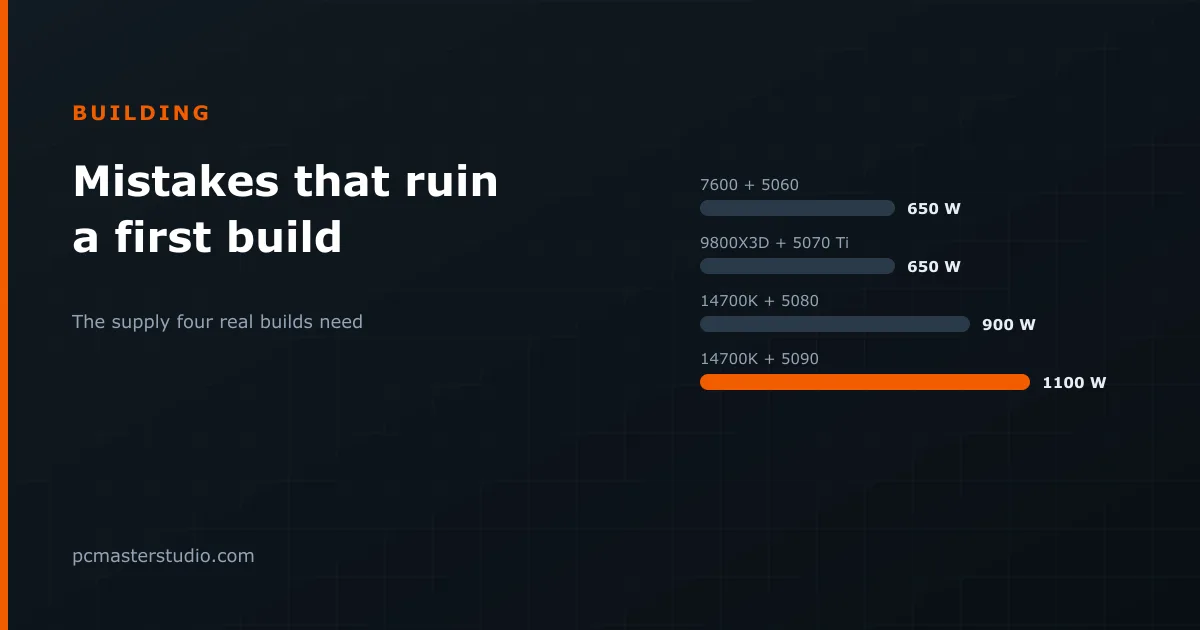
The fix is sizing, not cooling. Our power supply calculator adds the card, the processor and 50 W for the rest, then applies 25 % headroom for exactly those spikes. Some examples of what it recommends:
| Build | Full-load draw | Recommended supply |
|---|---|---|
| Ryzen 5 7600 + RTX 5060 | 260 W | 650 W |
| Ryzen 7 9800X3D + RTX 5070 Ti | 470 W | 650 W |
| Core i7-14700K + RTX 5080 | 663 W | 900 W |
| Core i7-14700K + RTX 5090 | 878 W | 1100 W |
5. Leaving the memory profile off
Memory boots at a conservative default speed, not the one printed on the box. The rated speed is a profile — XMP on Intel, EXPO on AMD — that has to be switched on once in the BIOS. Plenty of people run for years with memory well below its rated specification and never find out.
Two related mistakes sit next to it. Memory must go into the slots the motherboard manual specifies for two modules — usually the second and fourth, labelled A2 and B2 — or it may run in single-channel mode at half the bandwidth. And the first boot after enabling a profile on a new DDR5 system can take a minute or more of black screen while the board trains the memory. That is normal; switching off during it is not.
6. Buying the power supply last, on price
It is the component everything else depends on, and the first one cut when the budget tightens. The logic is backwards: it is the part whose failure can take others with it. The efficiency badge matters less than people think; what matters is a reputable maker, proper protection circuits and a long warranty. If the graphics card uses the 16-pin 12V-2x6 connector — most cards from about 300 W — a supply with a native cable avoids an adapter in the highest-current path in the machine. For the full picture, see which graphics card your power supply can run.
Three more that are easy to avoid
The monitor plugged into the motherboard
The motherboard has video outputs for the processor's integrated graphics. With a graphics card installed, the monitor has to go into the card. Plugged into the board, you either see nothing — many processors have no integrated graphics at all — or you get a machine running on the weakest graphics in the case. The symptom is a new PC that games far worse than it should.
The plastic film on the cooler
Most coolers ship with a protective film over the contact plate. Leave it on and temperatures will be alarmingly high from the first minute. It takes a second to check before the cooler goes on.
Fans that fight each other
Every case fan has arrows on its frame showing airflow direction. The usual arrangement is intake at the front and bottom, exhaust at the back and top. Two fans pushing against each other cancel out and leave hot air trapped around the graphics card.
Practise before you build
None of these requires expertise, only knowing in advance where to look. The PC building simulator walks through the installation order and flags incompatibilities between parts at no cost. Doing a build there first is the cheapest way to make your first real one feel like your second.