An AMD processor rated at 65 W and an Intel one rated at 125 W might draw nearly the same power, or the Intel one might draw twice as much — and neither number on the box will tell you which. The two companies measure different things and print them under similar names. This article decodes the figures, shows what each processor can actually draw, and turns that into a cooler size.
Four abbreviations, two vocabularies
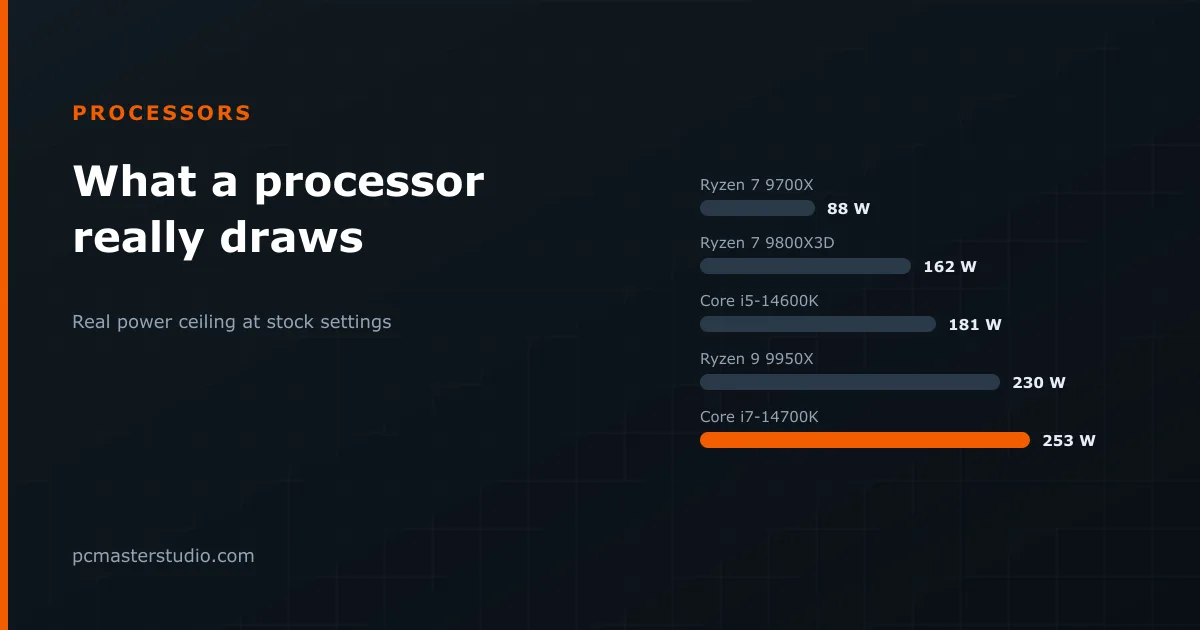
AMD prints a TDP, thermal design power. It is a cooling target, not a power limit. The limit is a second figure AMD does not put on the box: PPT, package power tracking, which on current desktop Ryzen chips is 1.35 times the TDP. A "65 W" Ryzen is allowed to draw 88 W; a "120 W" one, 162 W.
Intel prints two figures, and uses different names for them. Processor base power, also called PL1, is what the chip may draw indefinitely. Maximum turbo power, or PL2, is what it may draw while boosting. Officially, PL2 is time-limited; in practice, most enthusiast motherboards let the chip stay there, and Intel's own recommended profile for its unlocked 14th-generation chips sets both limits to 253 W.
So the comparable number is AMD's PPT against Intel's PL2 — the ceiling each chip will reach under a full load.
The real ceilings
| Processor | On the box | Real ceiling |
|---|---|---|
| Ryzen 5 9600X | 65 W TDP | 88 W PPT |
| Ryzen 7 9700X | 65 W TDP | 88 W PPT |
| Ryzen 7 7700 | 65 W TDP | 88 W PPT |
| Ryzen 5 7600X | 105 W TDP | 142 W PPT |
| Ryzen 7 9800X3D | 120 W TDP | 162 W PPT |
| Ryzen 9 9900X | 120 W TDP | 162 W PPT |
| Ryzen 9 9950X | 170 W TDP | 230 W PPT |
| Core i5-12400F | 65 W base | 117 W turbo |
| Core i5-13400F | 65 W base | 148 W turbo |
| Core Ultra 5 245K | 125 W base | 159 W turbo |
| Core i5-14600K | 125 W base | 181 W turbo |
| Core Ultra 7 265K | 125 W base | 250 W turbo |
| Core i7-14700K | 125 W base | 253 W turbo |
| Core i9-14900K | 125 W base | 253 W turbo |
Two things stand out. The Core i5-12400F and the Ryzen 7 7700 share a "65 W" label and have ceilings 29 W apart. And the Core i7-14700K and the Ryzen 7 9800X3D, which sit close in gaming performance, differ by 91 W at full load.
Why games rarely reach the ceiling
These are all-core figures: rendering, video encoding, compiling, the loads that keep every core busy. Games occupy a handful of cores, and most processors draw well under their limit while playing — often less than half of it. That matters for two decisions. For the power supply, size for the ceiling, because the machine will one day run something that reaches it. For noise, what you hear while gaming is set by the much lower gaming draw.
Our power supply calculator uses the processor's rated figure; the 25 % headroom it adds on top covers the gap to AMD's PPT. The methodology page explains that margin.
Sizing the cooler
A cooler has to remove, continuously, whatever the processor sustains. Size it to the ceiling from the table:
- Up to about 90 W — the 65 W Ryzen chips and Intel's 65 W parts at stock. The cooler in the box works, and any modest tower cooler makes the machine quieter.
- 90 to 160 W — the 105 and 120 W Ryzen chips and the mid-range Intel K parts. A good single-tower air cooler with a 120 mm fan is the right tool.
- 160 to 250 W — the high-end chips. A dual-tower air cooler or a 240–280 mm liquid cooler.
- Above 250 W — the 253 W Intel chips and anything with limits removed. A 360 mm liquid cooler, and even then the chip will reach its temperature limit under a sustained all-core load.
That last point is not a fault. Modern processors are designed to boost until they reach a temperature limit — around 95 °C for current Ryzen chips, up to 100 °C for Intel — and then hold there. A chip sitting at 95 °C under a rendering load is working as intended. What a bigger cooler buys is higher sustained clocks and less fan noise, not safety. Whether that is better done with air or liquid is its own question, covered in our air vs liquid cooling comparison.
When you can do better than stock
The same table works in reverse. Most processors sit on a steep efficiency curve at the top: the last 20–30 % of power buys only a few percent of performance. Lowering the limit — AMD's Eco Mode, or setting PL1 and PL2 yourself in the BIOS — can cut the power a chip draws under load substantially while losing single-digit percentages in all-core work and often nothing measurable in games. It is the cheapest way to make a hot machine quiet.
Where these figures can be off
The ceilings are specifications, and motherboards are free to ignore them; check what your board actually applies before sizing a cooler for the box figure. Individual chips also vary, and heavy vector workloads can push a processor above the draw of ordinary all-core tasks. Treat the table as the power each chip is designed to draw at stock, which is the right starting point for choosing both the supply and the cooler.