A PCIe 5.0 drive advertises twice the speed of a PCIe 4.0 one, often for a good deal more money. Whether you will ever notice the difference depends on a question the box does not ask: what the drive spends its day doing. This article looks at what games actually require, where the extra speed shows up, and where it disappears.
What games ask for
We read the storage requirements of the 25 games in our catalogue released since 2023. Nineteen of them ask for an SSD. One — DOOM: The Dark Ages — asks specifically for an NVMe drive. None of them asks for a particular PCIe generation. The requirement that moved is capacity: the median recommended install is 100 GB, the largest 190 GB, and the 23 games that state a size add up to about 2.3 TB. The full reading is in what recent PC games actually ask for.
So the requirement is an SSD, preferably NVMe, and plenty of space. The generation is a choice about something else.
The generations in numbers
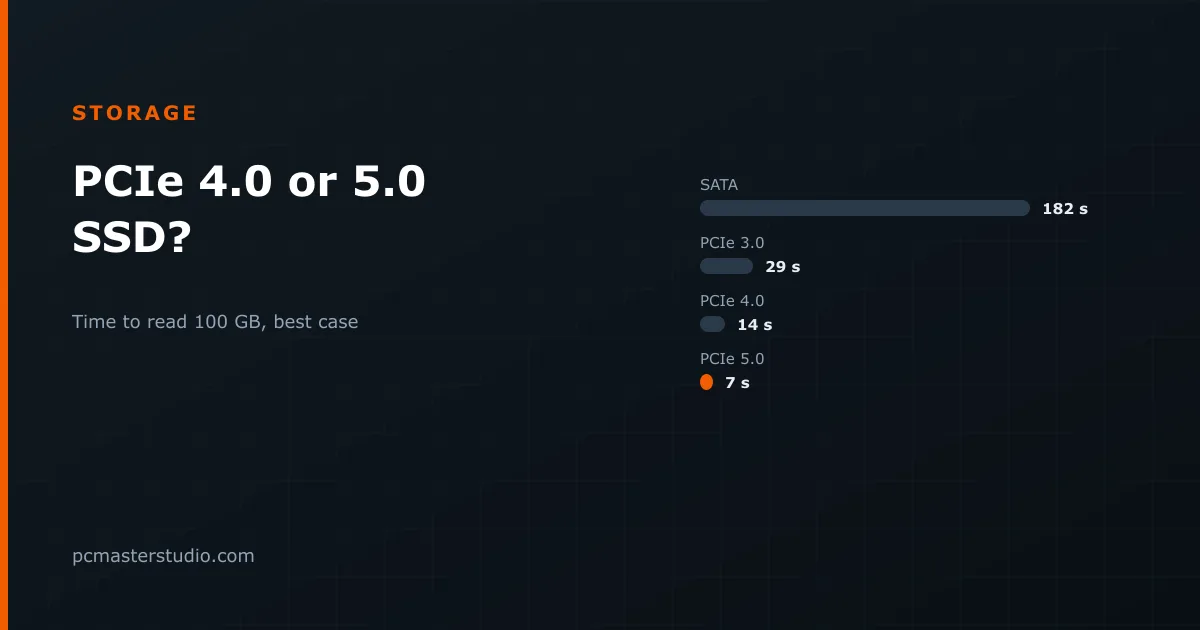
Each PCIe generation doubles the speed of the link. What drives achieve in sequential reads — large files, read from start to finish — is close to that link limit:
| Interface | Typical sequential read | Reading 100 GB | Reading 40 GB |
|---|---|---|---|
| SATA SSD | 0.55 GB/s | 182 s | 73 s |
| PCIe 3.0 NVMe | 3.5 GB/s | 29 s | 11 s |
| PCIe 4.0 NVMe | 7 GB/s | 14 s | 6 s |
| PCIe 5.0 NVMe | 14 GB/s | 7 s | 3 s |
On paper, PCIe 5.0 halves every figure. The question is how often a real task looks like the right-hand columns.
Why games barely notice
A game does not load by reading one large file at full speed. It reads thousands of smaller assets, then decompresses them, builds data structures, compiles shaders and sets up the level — work done by the processor. Once the drive is fast enough that the processor is the slower of the two, a faster drive changes little. That point was passed somewhere around the jump from SATA to NVMe. Tests of the same game on PCIe 3.0, 4.0 and 5.0 drives typically show load times within a second or two of each other.
Microsoft's DirectStorage was designed to change that, by moving decompression to the graphics card and letting the drive feed it directly. It works, and in the games that use it load times fall sharply — but only a handful of games use it, and even there a fast PCIe 4.0 drive is already enough to keep up.
What does make a system feel quick is how fast the drive answers many small, scattered requests: opening programs, booting, searching files. On that measure — random reads at low queue depth — the generations are far closer to each other than the headline numbers suggest.
Where PCIe 5.0 does earn its price
- Moving very large files. Video editors working with high-bitrate footage, anyone copying large datasets or disk images, scrub and copy at a speed the sequential figure really describes.
- Loading large AI models. A local language model is a handful of very large files read start to finish — the best case in the table. A 40 GB model loads in a few seconds either way, but if you switch between big models many times a day, the difference adds up. Our article on the VRAM local models need gives their sizes.
- A drive you intend to keep for many years, on a platform that supports it, when the price gap is small.
The costs that are not on the price tag
Heat. PCIe 5.0 controllers run hot, and most drives ship with a substantial heatsink — some with a small fan. Without adequate cooling they throttle, which removes the speed you paid for. Make sure the motherboard's M.2 heatsink or the drive's own fits your case and graphics card.
Platform. You need a motherboard with a PCIe 5.0 M.2 slot, which is not every board even on current platforms. On some boards, using that slot takes lanes from the graphics card slot and runs the card at half its link width. Check the manual before assuming the fast slot is free.
What else the money could buy. The premium for a PCIe 5.0 drive is often the price of doubling the capacity of a PCIe 4.0 one. With games at 100 GB each, capacity is the resource you run out of first.
What to buy
For a gaming or general-purpose machine, the sweet spot is a PCIe 4.0 NVMe drive of 2 TB. Two details matter more than the generation. Prefer TLC flash, which stores three bits per cell, over QLC, which stores four: QLC is cheaper per terabyte but slows down more during long writes and wears out sooner. And prefer a drive with its own DRAM cache, or one that borrows a little system memory for the same purpose — HMB, host memory buffer — and reviews well; drives with neither slow down noticeably as they fill.
That drive clears every game requirement with room to spare, runs cool, and leaves money for the parts that change frame rates. Choose PCIe 5.0 when your work is dominated by very large sequential files and your board has the slot to spare. NVMe, M.2 and PCIe themselves are explained in our hardware glossary.
Where these figures can be off
Drive speeds vary widely within each generation; a cheap PCIe 4.0 drive can be slower than a good PCIe 3.0 one, and many drives slow sharply once their fast cache fills during a long write. The table shows theoretical best cases, and real transfers are limited by file system, file sizes and the source or destination. Read reviews of the specific model, with an eye on sustained write speed and temperatures rather than the peak number on the box.