

Entry level · 1080p
Starting Power
The cheapest build that still holds 60+ FPS at 1080p with settings turned up. Sized so the GPU, not the CPU, is what you upgrade next.
View the build Shop this build Plan your PC
before you buy it.
Size the power supply, check for a bottleneck, see whether a language model fits on your graphics card and assemble a machine part by part — free, in your browser, with every formula explained.
The toolkit
Size a power supply, spot a bottleneck, check whether a model fits in VRAM. Every calculator runs in your browser — nothing to install, nothing to sign up for.
Complete, coherent parts lists by budget.
Size the PSU your components actually need.
Check whether a model fits on your card.
See whether the CPU or the GPU is holding you back.
Estimate tokens per second on your hardware.
Work out what your machine costs to run.
Compare build times across processors.
Own the card, or pay by the hour?
Step-by-step guides to choosing parts and reading hardware specifications, with the numbers explained.
Latest articles
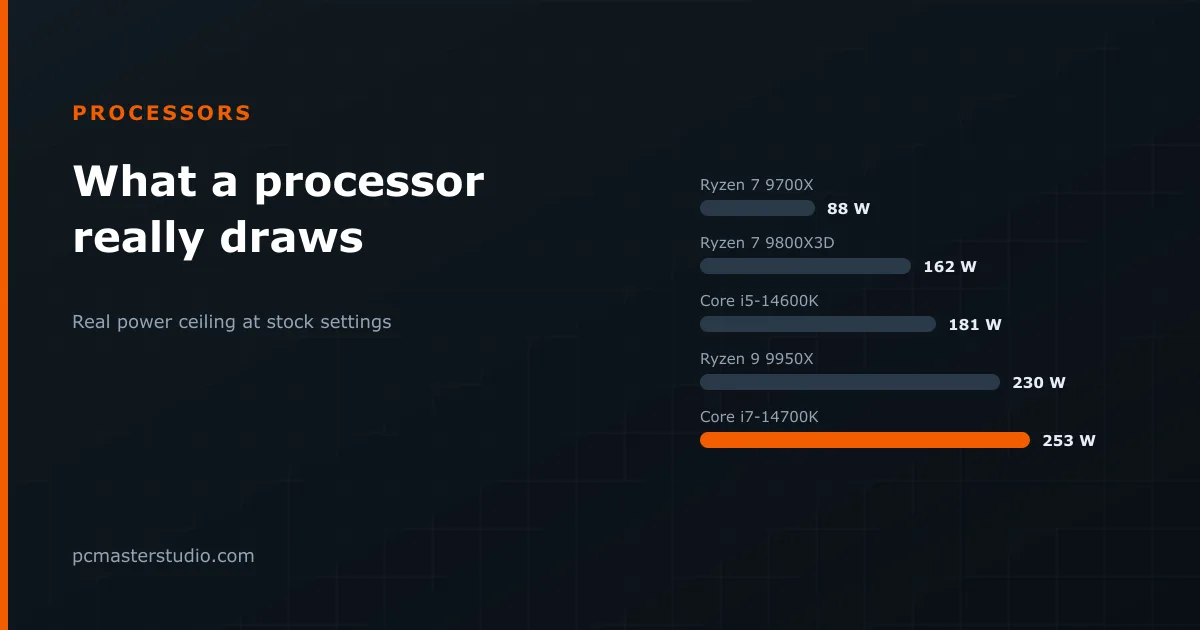
AMD and Intel print different figures under similar names. The real power ceiling of fourteen processors, why games rarely reach it, and how to size the cooler.
Three graphics cards come in 8 and 16 GB versions of the same chip. What the memory alone is worth, the settings that decide it, and when the cheaper card is a trap.
The efficiency metals save a few euros a year between neighbouring tiers. What 80 PLUS does not certify, and why ATX 3.1 matters more with a modern graphics card.
Example builds
From a 1080p gaming machine to a workstation for local AI. Open one in the configurator to see every part and its estimated power draw.
The cheapest build that still holds 60+ FPS at 1080p with settings turned up. Sized so the GPU, not the CPU, is what you upgrade next.
View the build Shop this buildBuilt around core count and memory bandwidth: 4K timelines, Docker stacks and long compiles instead of frame rates.
View the build Shop this buildThe X3D-cache processor that leads at high refresh rates, with enough graphics card behind it for 4K at high settings.
View the build Shop this buildMaximum VRAM and thread count: local LLM inference, 8K renders and simulation workloads that a more modest consumer build cannot handle.
View the build Shop this buildPC Master Studio is a set of free calculators and guides for the decisions that come before buying parts. Each tool answers one question with the numbers shown, so you can check the reasoning instead of taking a verdict on trust. Used in order, they take a build from an idea to a parts list.
For local language models the questions change: whether a model fits in the graphics card's memory, how fast it will write, and whether buying the card beats renting one. The VRAM calculator, the inference speed estimator and the buy vs rent calculator answer them in that order.
Every tool reads from one hardware catalogue of manufacturer ratings and a relative performance index, and every formula, constant and known limit is written out on the methodology page. The site is run by one person, described on the about page; if a figure looks wrong, the contact page says how to report it.